Six languages
Each person picks their own from the globe icon, and the business sets a default. The workspace, onboarding, emails and the Field app are all translated.
- English
- Español
- Tiếng Việt
- 简体中文
- 繁體中文
- Filipino

One app for local businesses that runs the whole loop: get found, win the inquiry, schedule the work, get paid on site, ask for the review, and see which marketing actually made money. When something needs attention, Oprenzy drafts the fix and waits for your OK.
No account needed for the sample. Try approving something on the right.
Evergreen Home Services
Review
Thank you, Dana! Glad the water heater swap went smoothly. See you at the spring tune-up.
Google review, received yesterday
Content
Furnace acting up? We have same-week tune-up slots in Sacramento and Elk Grove. Book online in a minute.
Content calendar, nothing scheduled this week
Inquiries
Hi, it’s Evergreen Home Services. We can come by Thursday between 10 and 12. Does that work for you?
Leads from your website form, today at 8:02
Sample data from a fictional business.
Most tools hand you a report and leave the work to you. Oprenzy does the work, in your words and your language, and asks before anything changes.
Every week
Your map ranking, website, Google listing and reviews, so you don’t have to.
As things come up
Findings arrive with the fix already written: a review reply, a post, a follow-up.
When it suits you
Approve, edit or skip in one tap. About ten minutes a week, from your phone.
Every payment
Each payment links back to the lead and the marketing that found the customer.
See the app
These screens come straight from the interactive sample workspace. Every one of them works: open the demo and click around.
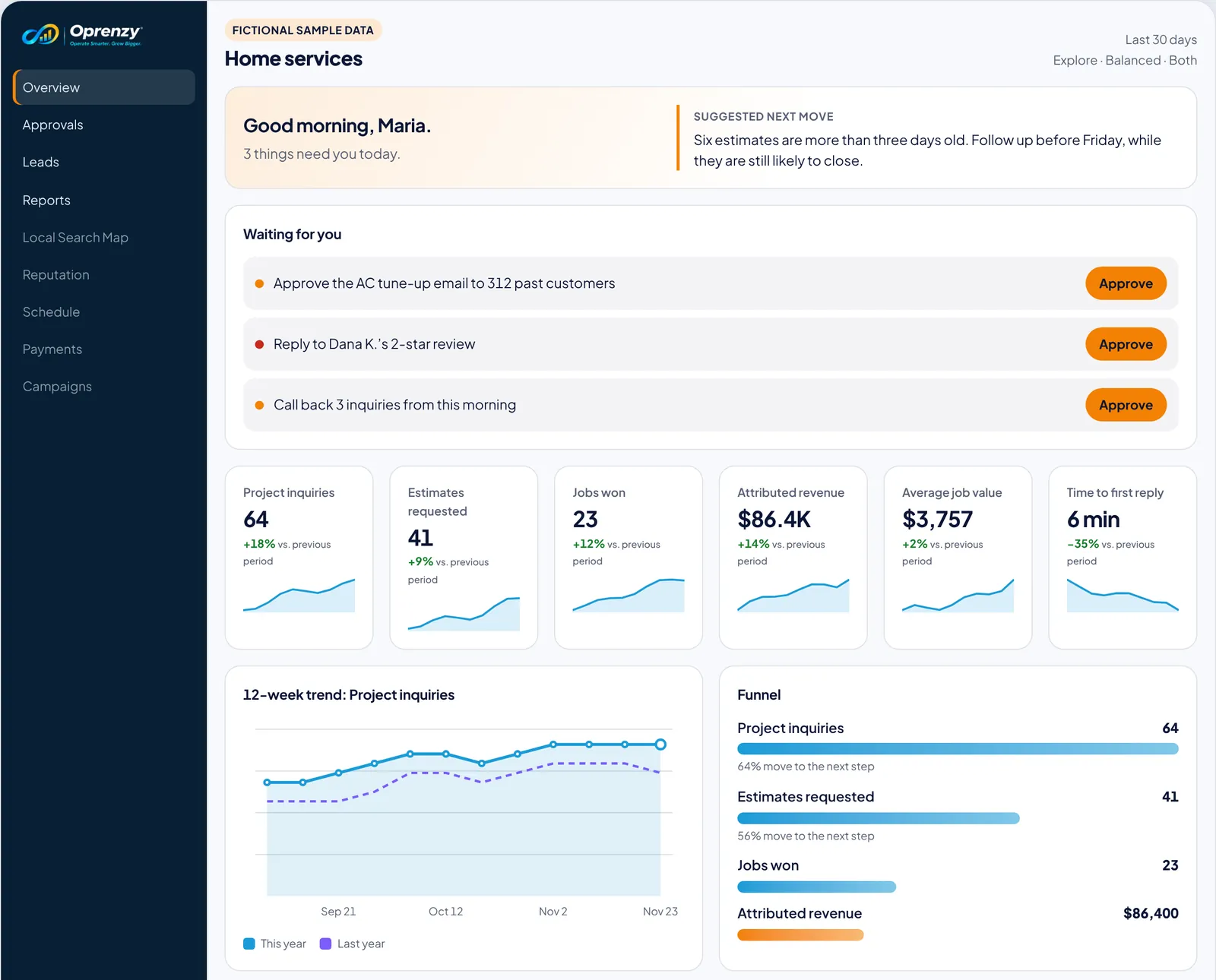
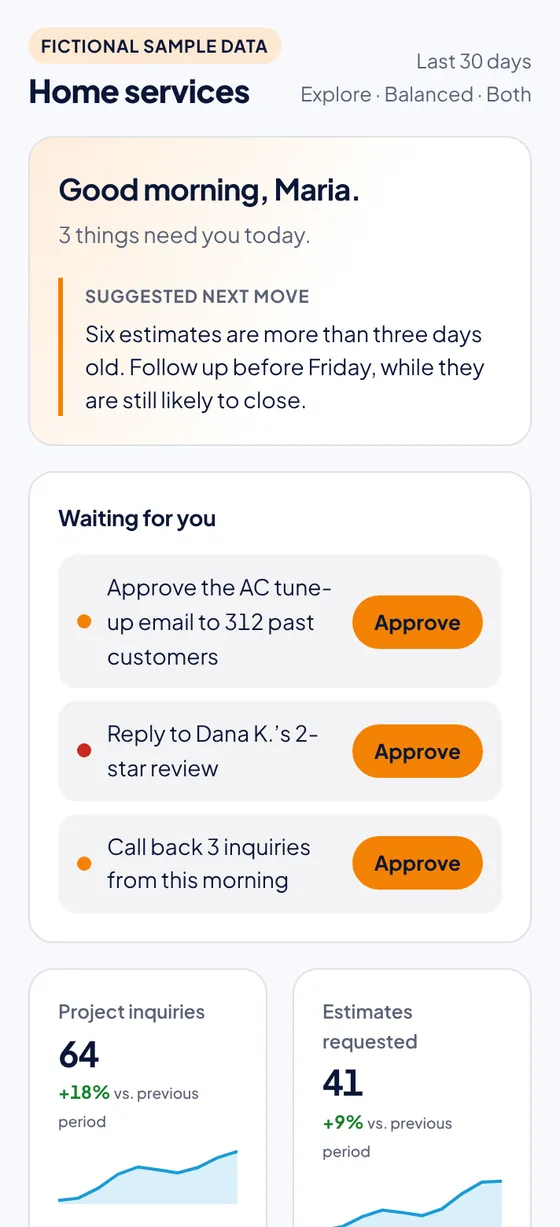
What needs you, the suggested next move, key numbers with trends, and your funnel in your industry’s words.
Open the live demoSample data from fictional businesses.
Field-service tools see the job but not the marketing. Marketing tools see the lead but not the payment. Oprenzy sees both. Here’s what each part does for Evergreen Home Services, our sample business.
Your place in Google Maps results for furnace repair, checked at 25 points around your shop.
Sample data from a fictional business.
Explore the sample workspaceTwo promises sit under everything Oprenzy does, in every tool and every industry.
You see where a figure came from and when it was checked. If something isn’t connected, we say so rather than show you a zero.
New inquiries this week
11
Calls answered this week
Not connected
Shown as unknown, never as 0. Connect your Google listing to fill it in.
Start with everything on approval. Switch on Autopilot only for the areas you choose, and switch it off whenever you like.
Nothing goes out until you tap Approve.
Fixes arrive drafted. Approve, edit or skip each one.
The owner, the office, the marketing lead, the accountant and the crew all work in one place, each with exactly what they need.
Each person picks their own from the globe icon, and the business sets a default. The workspace, onboarding, emails and the Field app are all translated.
Everyone sees only what their job needs, enforced all the way down to the database.
The web app installs on iPhone and Android with a bottom tab bar, a quick-create sheet and alerts for approvals, new leads and bad reviews, with quiet hours. Crews and owner-operators use the Oprenzy Field app, with phone screens for retail associates and hospitality staff too.
A grouped menu, Ctrl+K search across pages, jobs, leads and campaigns, a + Create menu and live screens. Every table sorts and every figure is clickable: funnels, donuts, sparklines, gauges and heatmaps.
Six themes plus a custom theme studio that checks colour contrast, in light, dark or auto. A trust centre to export your data, see your own audit log and revoke connections. Team invitations, profile photos and strict separation between businesses.
Multi-location roll-ups for businesses with more than one site, and an agency and partner mode for the people who help you market.
One platform, five kinds of business. Each gets its own dashboard, its own funnel and its own words: jobs won, not conversions.

What you count: Jobs won
Optional add-on
A branded client portal that follows a project from lead to warranty. Proposals, selections, changes, payments and paperwork live in one place your clients can see. Use it with Oprenzy or on its own. It needs only PHP and MySQL, the kind of hosting most businesses already have.

14 project roles, from owner and finance admin to architect, subcontractor, client and guest; prices show only to people who handle money. Recommended for construction and remodeling, available to every industry, with single sign-on and project status flowing back to Oprenzy.
We’re setting prices after talking with owners, not before. Here’s what we’ve committed to.
No paid checkout is available. Prices will be published before anyone is asked to pay.
Oprenzy is in a development preview and access is by invitation. You can explore the sample workspace without an account.
Pricing isn’t set yet. We’re talking with owners first. The plan is one clear price per location, with visible limits and no credit maths.
Not unless you switch it on. Drafts wait for your approval. Autopilot only works in the areas you turn on, and it never launches campaigns or replies to low ratings by itself.
Every figure shows its source and how fresh it is. If something isn’t connected, we say so instead of showing a zero.
English, Spanish, Vietnamese, Simplified Chinese, Traditional Chinese and Filipino. Each person picks their own, and the business sets a default.
Yes. The web app installs on any iPhone or Android phone with alerts, and the Oprenzy Field app gives crews their day, even offline.
There are five roles: owner, office manager, marketing lead, accountant and crew. Each sees only what it needs. Office managers don’t see money figures, and crews only see their own jobs.
Yes. Import outcomes like reservations or sales by spreadsheet, or connect booking and point-of-sale systems. Export your data whenever you like.
Walk through the sample workspace now, or ask for an invitation to the preview.